Your sales reps spend more than half their time talking to people who were never going to buy. The problem isn't the reps. It's that nobody screened the leads before the dial.
That's the problem AI voice agent lead pre-screening solves. Before any rep picks up the phone, a voice AI calls each lead, asks 4-5 qualification questions, scores the answers, and routes only the qualified contacts to your team. The whole thing takes 60-90 seconds per lead. TopCalls processes 63,000+ of these calls daily at $0.35/minute, and teams using pre-screening pipelines see connect-to-qualified rates well above industry averages.
1. What Is AI Voice Agent Lead Pre-Screening?
AI voice agent lead pre-screening is the process of using a conversational AI system to call leads before a human rep gets involved. The AI runs a structured qualification conversation, collects answers to BANT or custom criteria, and routes qualified leads to your CRM or calendar based on the results.
The key difference from a traditional IVR or phone tree: the AI actually talks. It listens to the prospect's response, asks follow-ups when needed, and handles objections with a natural rhythm. A prospect often doesn't realize they're being screened until they're booking time with a rep.
What a voice bot can pre-screen in a single call:
Budget fit: "Is [price range] within the budget you're working with this quarter?"
Timeline: "Are you looking to implement something in the next 30-60 days, or further out?"
Decision authority: "Are you the person who makes purchasing decisions for tools like this?"
Relevant pain: "How are you currently handling [the process your product solves]?"
Company fit: "How many reps are on your sales team right now?" or any ICP-specific signal.

The AI then scores the conversation against your criteria. Qualified leads trigger a CRM update, a rep notification, or a calendar booking. Everyone else goes to a nurture bucket, not your active pipeline cluttering everything up.
2. How Automated Lead Qualification Calls Work, Step by Step
Here's what actually happens inside an automated lead qualification call:
Step 1: Lead enters the queue. This could be a fresh inbound form fill, a trade show list, or a re-engagement segment. Pre-screening campaigns run on any lead source.
Step 2: The AI calls within minutes. Using TopCalls' AI voice agents for outbound calling, the call triggers automatically at the right time window (9 AM to 6 PM local). No manual dialing, no queue to manage.
Step 3: The AI opens with context. "Hi [name], I'm calling from [Company] about [topic]. I have a couple of quick questions to make sure we connect you with the right person. Is now a good time?" Most leads say yes. The whole call takes 60-90 seconds.
Step 4: The AI asks the qualification questions. These are pre-set for your ICP. The AI listens, handles brief objections, and moves through the script at a conversational pace.
Step 5: The AI scores the lead. Based on the answers, it applies your qualification logic. A lead that hits 3 of 4 criteria = qualified. A lead that hits 1 of 4 = nurture.
Step 6: Qualified leads route automatically. Your CRM gets updated with the full transcript and score. Qualified contacts can trigger a calendar link via SMS, a rep notification, or a same-day callback.
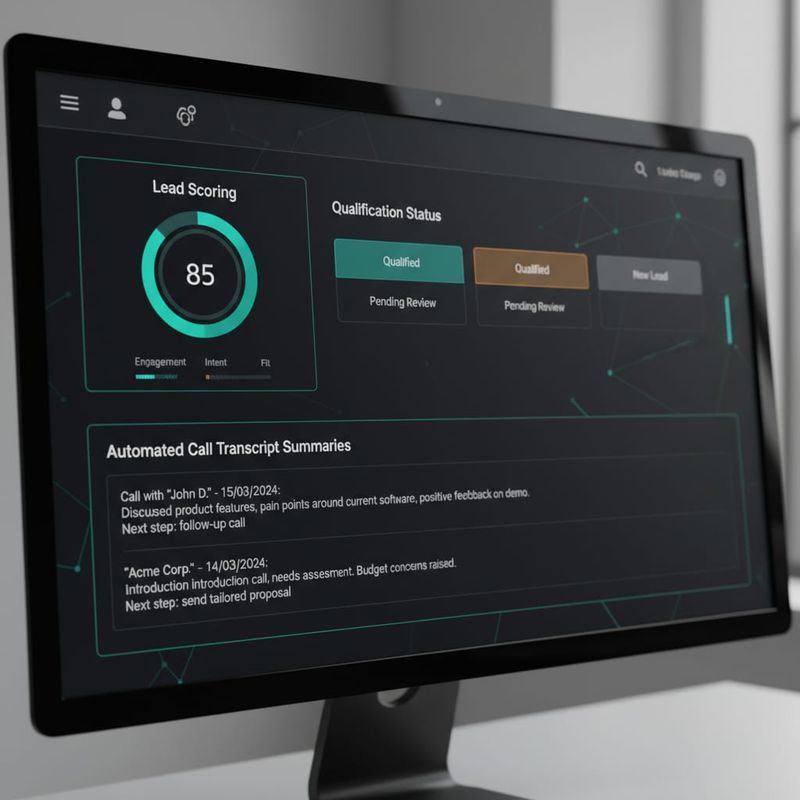
Total time per lead: under 2 minutes. Total rep time required: zero. Run the ROI calculator to see what that saves your team at your current call volume.
3. What's the Best Voice AI Screening Tool for Pre-Screening Leads?
The best voice AI screening tool for pre-screening depends on your call volume and how much you need to customize the qualification logic. But a few factors separate the tools that actually work from the ones that sound good in a demo.
Response latency. If the AI pauses 2-3 seconds between lines, the call sounds broken. TopCalls runs at sub-500ms latency. Anything above 1 second feels unnatural to a prospect.
Language coverage. If your lead lists include Spanish, French, Portuguese, or Arabic-speaking contacts, single-language tools cut off a big chunk of your market. TopCalls supports 29+ languages with native-sounding regional accents.
Qualification logic flexibility. Linear scripts don't work well. You need branching: if the lead says "not right now" to the timeline question, the AI should probe for when, not just mark them disqualified.
CRM integration. The screening output is useless if it doesn't land in your CRM in real time. Native integrations with Salesforce, HubSpot, Pipedrive, and Close matter.
Compliance. Pre-screening calls trigger the same TCPA and TSR rules as any outbound call. Look for built-in consent handling and do-not-call scrubbing.
For automated lead qualification at scale, TopCalls handles all of these. You can run 1,000 pre-screening calls in the same time a rep makes 30.
4. Five Signals a Voice Bot Can Pre-Screen in Under 90 Seconds
Voice bots aren't limited to yes/no questions. A well-built pre-screening call picks up five distinct signals:
Budget readiness. Not just whether budget exists, but confidence and specificity. "We have some budget set aside" scores differently from "yes, we have $50k approved for Q3."
Timeline urgency. "Actively evaluating now" vs "exploring for next year" is a critical routing split. Reps should be talking to the first group, not both.
Decision authority. The AI asks early. A non-decision maker still gets qualified, but routes to a champion nurture sequence, not a fast-close follow-up.
Technical fit. For product-led or technical products, the voice bot can screen for tech stack, team size, or industry, depending on your ICP criteria.
Engagement level. Response speed, word count, and tone correlate with conversion likelihood. A lead who gives detailed, specific answers is much warmer than one who says "sure" and "I guess" throughout. TopCalls captures and scores this signal.

For similar pre-qualification logic applied to other use cases, the legal client intake guide and the voice AI recruitment screening guide cover how voice bots handle intake flows that require detailed pre-screening.
5. Where AI Lead Pre-Screening Fits in Your Sales Funnel
Pre-screening isn't a replacement for the full sales cycle. It's a filter you put at the top. Here's how it sits in a typical funnel:
Top of funnel: Lead comes in from an ad, a form, a trade show, or a cold list. Volume is high, quality is mixed. The AI pre-screens within minutes of lead entry.
The filter: The AI conversation takes 60-90 seconds. Leads that hit your minimum criteria enter the active pipeline. Everyone else goes to low-touch nurture.
Middle of funnel: Reps receive only qualified leads with a full conversation transcript and score attached. Call prep time drops. Every conversation starts with context.
Bottom of funnel: Demo calls convert better. Leads are already educated on the product and the objections that come up are from real concerns, not basic mismatches.
For teams using TopCalls smart campaigns, the pre-screening campaign triggers automatically based on lead source, list segment, or CRM event. No manual queue management.
For performance benchmarks, the AI cold calling metrics guide has specific numbers on connect rates, qualification rates, and conversion by lead source.
6. How to Set Up Your First Lead Pre-Screening Campaign
Full campaigns are live within 2 weeks. Here's the actual setup process:
Step 1: Define your qualification criteria. Write down the 4-5 questions that separate a qualified lead from a time-waster. Make them short, conversational, and specific to your ICP.
Step 2: Map the scoring logic. Which combination of answers = qualified? Which = nurture? Which = disqualify immediately? Document this before you build anything.
Step 3: Connect your lead source. TopCalls integrates with Salesforce, HubSpot, Pipedrive, Close, and 5,000+ apps via Zapier. Leads get queued automatically as they arrive.
Step 4: Set your call window and retry logic. For inbound leads, under 5 minutes from form submission. For outbound lists, 9 AM to 6 PM local time with 2-3 retry attempts on no-answer.
Step 5: Configure routing. Qualified leads trigger a CRM update, a rep notification, and optionally a calendar link via SMS. Disqualified leads get a nurture tag and drop out of the active pipeline.
Step 6: Run a test batch. Start with 20-50 leads. Listen to recordings. Check transcripts. Adjust the script and scoring logic based on what you actually hear.
Most teams hit their first batch of qualified leads on day 1.
7. Where Pre-Screening Leads with AI Doesn't Work
Not every scenario is a fit. Be honest about this before launching.
High-ticket enterprise with no prior relationship. For $200K+ deals where you're calling cold, a voice bot pre-screening call before a human has ever made contact usually damages trust more than it helps. Pre-screening works best for mid-market, SMB, and inbound leads who already raised their hand.
Heavily regulated industries without a compliance review. Healthcare, financial services, and legal have strict rules around who you can call and when. The AI handles TCPA and TSR, but these verticals need legal review before launch. The legal client intake guide covers how voice AI handles compliance-heavy intake flows.
Lists with stale or bad data. If 40% of your numbers are wrong, disconnected, or on a DNC list, the campaign burns minutes and produces nothing. Clean the list first.
Completely unpredictable discovery conversations. If every prospect needs a completely different opening question set depending on a variable you don't know in advance, scripted pre-screening adds friction. Custom dynamic branching can help, but it takes longer to build.
Frequently Asked Questions
What's the best voice AI screening tool for pre-screening leads?
The best tool has three things: sub-second latency so conversations feel natural, flexible qualification logic so the AI can branch on answers, and real-time CRM integration so qualified leads don't sit in a queue. TopCalls hits all three, with 29+ languages, built-in TCPA compliance, and pricing at $0.35/minute.
Can a voice bot handle objections during pre-screening?
Yes. Pre-screening bots handle the most common objections well: "I'm busy right now" (AI offers a callback), "not sure about budget" (AI notes it and continues), and "who is this?" (AI clarifies the company and purpose). Complex objections that need real sales judgment route to a rep automatically.
How many leads can an AI pre-screen per day?
With TopCalls, the limit is your list size, not the platform. A single campaign can run 1,000+ pre-screening calls per day. A human rep makes 40-60 calls on a very aggressive day. The parallel processing difference is significant at scale.
Does AI voice agent lead pre-screening work for inbound and outbound leads?
Both. For inbound, calling within 5 minutes of form fill dramatically outperforms longer delays. For outbound cold lists, pre-screening happens before a rep ever touches the phone. The logic is the same; the timing differs.
How does pre-screening affect the rest of the outreach sequence?
Teams using AI voice agents for user activation calls and pre-screening see higher connect rates on subsequent outreach because reps are calling people who already engaged with the AI. The pre-screening call itself counts as a touchpoint and warms the lead for the human follow-up.
The math is simple. If your reps spend 3 hours a day on leads that were never going to close, AI pre-screening gets those 3 hours back. $0.35/minute. Under 90 seconds per lead. 1,000 pre-screening calls in the time it takes a rep to dial 30.
Book a strategy call to see what a pre-screening setup looks like for your current lead volume.
Frequently Asked Questions
Get AI calling tips in your inbox
No spam. One email per week with actionable sales automation tips.